SMALL APP. SHARP CLAWS.

Scratch
that itch.

Your screenshots have
more to say.

Skritch scratches an itch. For the missing features you wished Skitch had: more images, smarter crops, quick video edits, and that beautiful little Drag Me tab.

Download Skritch ↓
Free & open source · Mac + Windows
Mac + Windows v0.2.2 · Pick your platform ↓
A little feedback. A lot clearer.
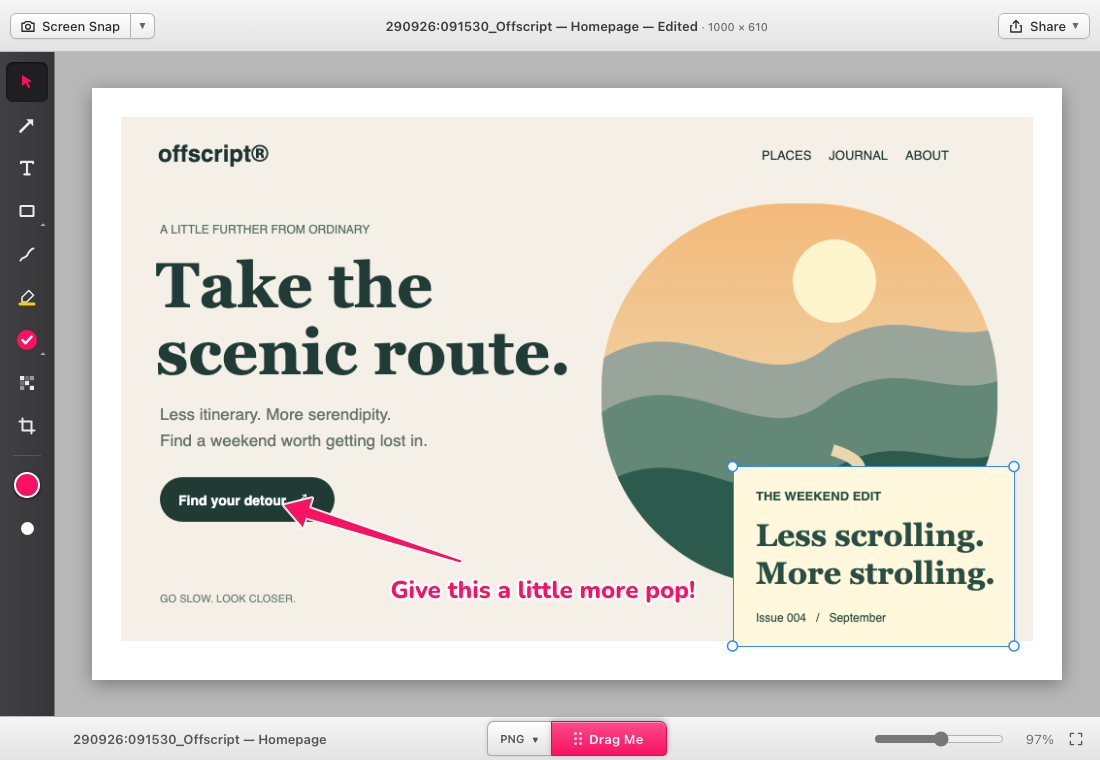
Skritch editor showing two image layers, a pink arrow and an editable annotation on a sample web design
Two images. One canvas. Your call.ACTUAL APP PREVIEW
SNAP IT.MARK IT.MAKE YOUR POINT.DRAG IT OUT.
THE GOOD STUFF

A few extra claws.

The simple joy of a screenshot app.
With room to do a little more.

01 / MORE ROOM TO THINK

One canvas.
As many ideas as you need.

Drop in another image. Move it, resize it, bring it forward or send it back. Build the whole picture without leaving your markup app.

02 / YOUR FILE. YOUR WAY.
PNGdesign-review.png

That satisfying
drag-and-done feeling.

Pick a format. Grab Drag Me. Drop a real file into Finder, File Explorer, or another app. PNG, JPG, TIFF, PDF, BMP and GIF are all on the menu.

Crop with intention.

Crop one image, or click outside to crop the canvas. Canvas crops trim the image layers too. No stray edges. Undo has your back.

A little video magic.

Trim and reorder clips, step through frames, and pull a still into the annotation editor. Quick edits without a full production suite.

Make your point.

Arrows, text, shapes, highlights, stamps and pixelation. Familiar tools, a compact rail, and just the right amount of hot pink.

Your work stays local.

No account. No cloud upload. Work locally, save editable projects, and share files when you’re ready. Your workflow is yours.

LESS FRICTION. MORE FLOW.

From “look at this”
to “got it.”

Capture a detail. Add a little context.
Keep moving.

CtrlShift5Your next screenshot starts here.
  1. 01

    Snap what matters.

    Capture a region, a window or a full display. Reuse your last area, or give yourself a countdown.

  2. 02

    Add your point of view.

    Mark it up, add a reference image, crop the noise. Your capture gets a timestamp and window title, ready to rename.

  3. 03

    Let it go.

    Choose your format and drag the file straight to its next home. Save a project if the conversation isn’t finished.

YOUR NEW LITTLE DESKTOP HABIT

Got an itch?

Make room for Skritch.

Free. MIT licensed. No account needed. Video tools included on both platforms.

A FEW SMALL DETAILS

Good to know.

Is this connected to Skitch?+

No. Skritch is an independent project inspired by the ease of Skitch. It adds its own approach to image layers, canvas cropping and quick video work. It is not affiliated with Skitch or Evernote.

Can I keep editing after I save?+

Save a .skritch project to retain the editable document. Skritch’s PNG export can also retain editable document data when it fits within the metadata limit. Other image formats export a flattened image.

What about Windows?+

Windows x64 downloads are available above: a setup EXE, an MSI installer, and a portable ZIP. The portable version needs WebView2 already installed. Keep its video tools and licenses next to skritch.exe. These builds are unsigned; see the Windows installation guide for details.

Screen Recording is already enabled. Why am I asked again?+

Older development builds used a different signing identity. Quit Skritch, install this build in Applications, then remove the old Screen Recording entry and add the installed app again. Future builds use the same Developer ID. See the README for the full migration steps.

Found a bug or have an idea?+

This is an early public release. Open an issue on GitHub with your OS version and a few steps to reproduce it. Please remove private information from any screenshots you share.